物理構成
tx100s3-01 (Debian 11, 16GB RAM)                tx100s3-02 (Debian 11, 16GB RAM)
├── KVMゲスト1: ha-master1 (3GB)             ├── KVMゲスト1: hb-master (3GB)
├── KVMゲスト2: ha-worker1 (4GB)(100GB DISK) ├── KVMゲスト2: hb-worker1 (4GB)(100GB DISK)
├── KVMゲスト3: ha-worker2 (4GB)             ├── KVMゲスト3: hb-worker2 (4GB)
論理構成
                 [ 高可用性K3sクラスター ] ------------ Keepalived + HAProxyで冗長化
                           ↓
    作成済み        [ 外部PostgreSQL ] ------------ Keepalived + HAProxyで冗長化
                (ホストA or B のどちらかで稼働)
                           ↓
    今回  [ ストレージ: Longhorn (2ノード分散) ]
                           ↓
            [ メールサーバー + その他サービス ]
1. ノードへのゾーンラベル付与
各ノードがどのゾーンに属するかをLonghornに認識させるため、ノードにラベルを付けます。
ラベルの作成
ホスト機ごとにk3sノードのラベル分けをする
ocarina@ocarina-AB350-Pro4:~$ kubectl label node ha-worker1 topology.kubernetes.io/zone=zone-a --overwrite
ocarina@ocarina-AB350-Pro4:~$ kubectl label node hb-worker1 topology.kubernetes.io/zone=zone-b --overwrite
Podのデプロイ先制御
ocarina@ocarina-AB350-Pro4:~$ kubectl label node ha-worker1 longhorn=true
node/ha-worker1 labeled
ocarina@ocarina-AB350-Pro4:~$ kubectl label node hb-worker1 longhorn=true
node/hb-worker1 labeled
ocarina@ocarina-AB350-Pro4:~$
間違えた他のノードにやった場合
kubectl label node 対象ノード topology.kubernetes.io/zone-確認
ocarina@ocarina-AB350-Pro4:~$ kubectl get nodes --show-labels | grep topology.kubernetes.io/zone
ha-worker1   Ready    <none>          15d   v1.34.3+k3s1   beta.kubernetes.io/arch=amd64,beta.kubernetes.io/instance-type=k3s,beta.kubernetes.io/os=linux,datacenter=ha,kubernetes.io/arch=amd64,kubernetes.io/hostname=ha-worker1,kubernetes.io/os=linux,node.kubernetes.io/instance-type=k3s,topology.kubernetes.io/zone=zone-a
hb-worker1   Ready    <none>          15d   v1.34.3+k3s1   beta.kubernetes.io/arch=amd64,beta.kubernetes.io/instance-type=k3s,beta.kubernetes.io/os=linux,datacenter=hb,kubernetes.io/arch=amd64,kubernetes.io/hostname=hb-worker1,kubernetes.io/os=linux,node.kubernetes.io/instance-type=k3s,topology.kubernetes.io/zone=zone-b
2. Longhornのインストール
Helm を使用してLonghornをインストールします。まずLonghorn Helmリポジトリを追加し、アップデートします。
install helm
https://helm.sh/ja/docs/intro/install/
curl -fsSL -o get_helm.sh https://raw.githubusercontent.com/helm/helm/main/scripts/get-helm-4
chmod 700 get_helm.sh
./get_helm.sh
install longhorn
マウントディレクトリの準備
ホスト機で実行
# worker1にssh
for x in ha-worker1 hb-worker1; do
    ssh -o BatchMode=yes k3sadmin@$x
done
各ノード内で作業
# shared準備
sudo tee /etc/init.d/root-shared << 'EOF'
#!/sbin/openrc-run

description="Make root filesystem shared"

depend() {
    # rootが利用可能になった直後、localmountより前に実行
    need root
    before localmount
}

start() {
    ebegin "Making root filesystem shared"
    mount --make-shared /
    eend $?
}

stop() {
    # 停止時は何もしない
    return 0
}
EOF

sudo chmod +x /etc/init.d/root-shared
sudo rc-update add root-shared boot
# 共有ストレージの作成
sudo fdisk /dev/vda
n
p
enter (pertition number)
enter (size)
p (確認)
w (書き込み)
sudo mkfs.ext4 /dev/vda4
sudo mkdir /var/lib/longhorn
echo '/dev/vda4 /var/lib/longhorn ext4 defaults 0 0' | sudo tee -a /etc/fstab
sudo mount /dev/vda4 /var/lib/longhorn
# longhorn利用可能に共有・bind設定(fstabに書くと/var/lib/longhornが既に/dev/vda4でmountするので無視されるためコマンドで対応する)
sudo vi /etc/local.d/longhorn-mount.start#!/bin/sh
# Longhorn bind mount script for Alpine Linux
mount -a
sleep 3
mount --bind /var/lib/longhorn /var/lib/longhorn
mount --make-shared /var/lib/longhorn
echo "$(date): Longhorn bind mount completed" >> /var/log/longhorn-mount.logsudo chmod +x /etc/local.d/longhorn-mount.start
sudo rc-update add local
sudo rc-service local start
# 確認
hb-worker1:~$ rc-update show | grep root-shared
root-shared | boot
sudo apk add findmnt
ha-worker1:~$ findmnt -o TARGET,PROPAGATION /var/lib/longhorn
TARGET PROPAGATION
/var/lib/longhorn shared
/var/lib/longhorn shared
ha-worker1:~$ cat /proc/self/mountinfo | grep longhorn
294 40 0:103 / /var/lib/kubelet/pods/4b7fc81f-8691-45d2-be24-a61e081942fc/volumes/kubernetes.io~secret/longhorn-grpc-tls rw,relatime shared:6 - tmpfs tmpfs rw,size=4020756k,inode64,noswap
480 27 253:4 / /var/lib/longhorn rw,relatime shared:43 - ext4 /dev/vda4 rw
366 480 253:4 / /var/lib/longhorn rw,relatime shared:43 - ext4 /dev/vda4 rw
404 40 0:144 / /var/lib/kubelet/pods/00d929ce-c580-417e-9533-c3c0ff2b98a9/volumes/kubernetes.io~secret/longhorn-grpc-tls rw,relatime shared:31 - tmpfs tmpfs rw,size=4020756k,inode64,noswap
# iscsiのインストール
sudo apk update
sudo apk add open-iscsi nfs-utils
sudo rc-update add iscsid
sudo rc-service iscsid startLonghorn Helmリポジトリを追加し、アップデート
ocarina@ocarina-AB350-Pro4:~$ helm repo add longhorn https://charts.longhorn.io
"longhorn" has been added to your repositories

ocarina@ocarina-AB350-Pro4:~$ helm repo update
Hang tight while we grab the latest from your chart repositories...
...Successfully got an update from the "longhorn" chart repository
Update Complete. ⎈Happy Helming!⎈
マルチゾーン対応のために defaultSettings を指定してインストール
- デフォルトのレプリカ数を2に設定し、レプリカのスケジューリングでゾーンを考慮するようにします。
- defaultSettings.replicaZoneSoftAntiAffinity=false とすることで、レプリカが可能な限り異なるゾーンに配置されるようになります(ハードアンチアフィニティに近い動作)
# values.yamlファイルを作成
cat > longhorn-values.yaml << 'EOF'
defaultSettings:
defaultReplicaCount: 2
replicaZoneSoftAntiAffinity: false
longhornManager:
nodeSelector:
longhorn: "true"
longhornDriver:
nodeSelector:
longhorn: "true"
csi:
attacher:
nodeSelector:
  longhorn: "true"
provisioner:
nodeSelector:
  longhorn: "true"
EOF
helm install longhorn longhorn/longhorn \ --namespace longhorn-system \ --create-namespace \ -f longhorn-values.yaml \ --wait
```text
I0217 00:05:11.888569  160108 warnings.go:107] "Warning: unrecognized format \"int64\""
I0217 00:05:12.007296  160108 warnings.go:107] "Warning: unrecognized format \"int64\""
I0217 00:05:12.344532  160108 warnings.go:107] "Warning: unrecognized format \"int64\""
I0217 00:05:12.765798  160108 warnings.go:107] "Warning: unrecognized format \"int64\""
NAME: longhorn
LAST DEPLOYED: Tue Feb 17 00:05:10 2026
NAMESPACE: longhorn-system
STATUS: deployed
REVISION: 1
DESCRIPTION: Install complete
TEST SUITE: None
NOTES:
Longhorn is now installed on the cluster!

Please wait a few minutes for other Longhorn components such as CSI deployments, Engine Images, and Instance Managers to be initialized.

Visit our documentation at https://longhorn.io/docs/
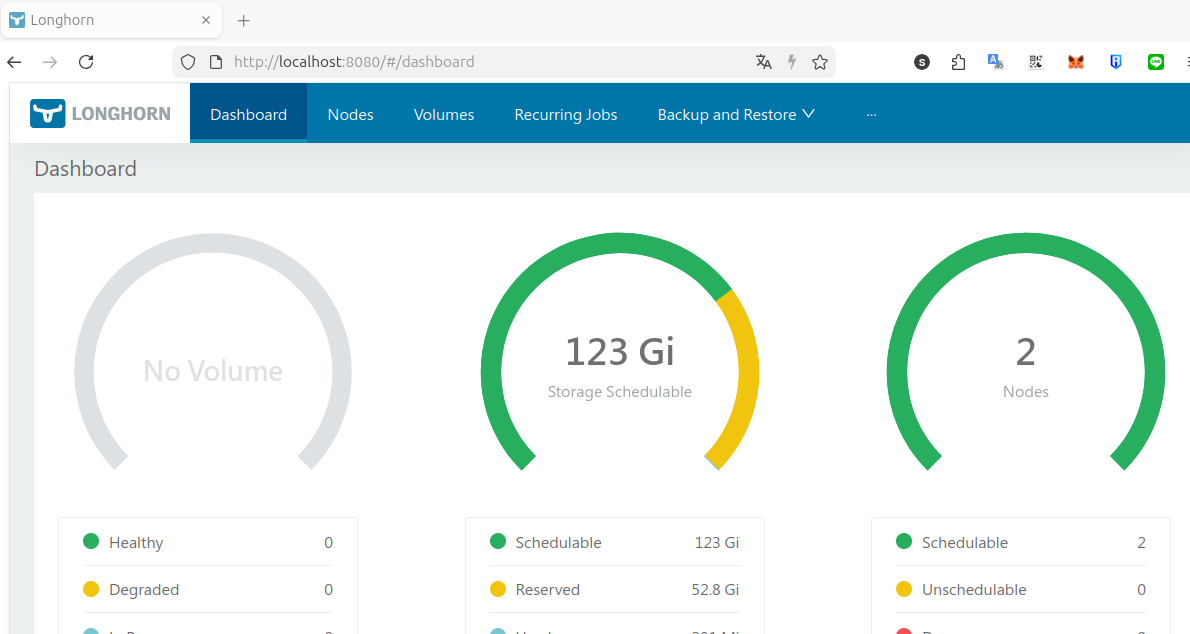
接続テスト
kubectl利用しているクライアント端末のみ接続可能
kubectl port-forward -n longhorn-system service/longhorn-frontend 8080:80http://localhost:8080/#/dashboard
以下は作り直す場合のメモ
kubectl delete namespace longhorn-system --force --grace-period=0

for crd in backuptargets.longhorn.io engineimages.longhorn.io nodes.longhorn.io; do
    echo "Processing $crd"
    kubectl patch crd $crd -p '{"metadata":{"finalizers":[]}}' --type=merge
done

for crd in $(kubectl get crd | grep longhorn | awk '{print $1}'); do     echo "Deleting $crd";     timeout 3 kubectl delete crd $crd; done

# pod以外削除
for tgt in $( kubectl get all -A|grep -i longhorn|grep -v pod\/ | awk '{print $2}') ; do timeout 1 kubectl delete -n longhorn-system $tgt ; done

# pod削除
kubectl delete pod -n longhorn-system --all --force --grace-period=0

# helm削除
kubectl delete secret -n longhorn-system -l owner=helm,name=longhorn --ignore-not-found=true
helm uninstall longhorn -n longhorn-system --no-hooks --ignore-not-found
# すべてのLonghorn関連リソースが消えたことを確認
kubectl get crd | grep longhorn || echo "No Longhorn CRDs remaining"
kubectl get namespace longhorn-system 2>/dev/null || echo "Namespace not found"
kubectl get all -A|grep -i longhorn
ocarina
絵が描けるボタン恐怖症インフラエンジニアです。